ClothShift – AI Fashion Try-On
- 1.8
- Rating
- 50.00K
- Installs
- Free
- Price

 Analysis by App-foxy
Trying on clothes through a phone sounds simple until the result looks obviously pasted on, the proportions feel wrong, or the edited image no longer resembles you. ClothShift – AI Fashion Try-On takes a more interesting route than a standard beauty filter: it focuses on creating clothing try-ons and AI-assisted photo edits. I spent time looking at where that idea is genuinely useful, where it still feels demanding, and whether it deserves a place among the many visual-editing apps competing for attention.
My overall impression is mixed. The concept is easy to understand, and it can be enjoyable when the source photo is clear and the clothing image is suitable. However, this is not the kind of app I would recommend blindly to everyone. Its current average rating is 1.8 from around 125 ratings, which is an important warning for anyone expecting consistently polished results. The app has also reached over 50 thousand installs, so it is not an unknown experiment, but popularity alone does not remove the need to check whether its workflow suits you.
How ClothShift feels in its current form
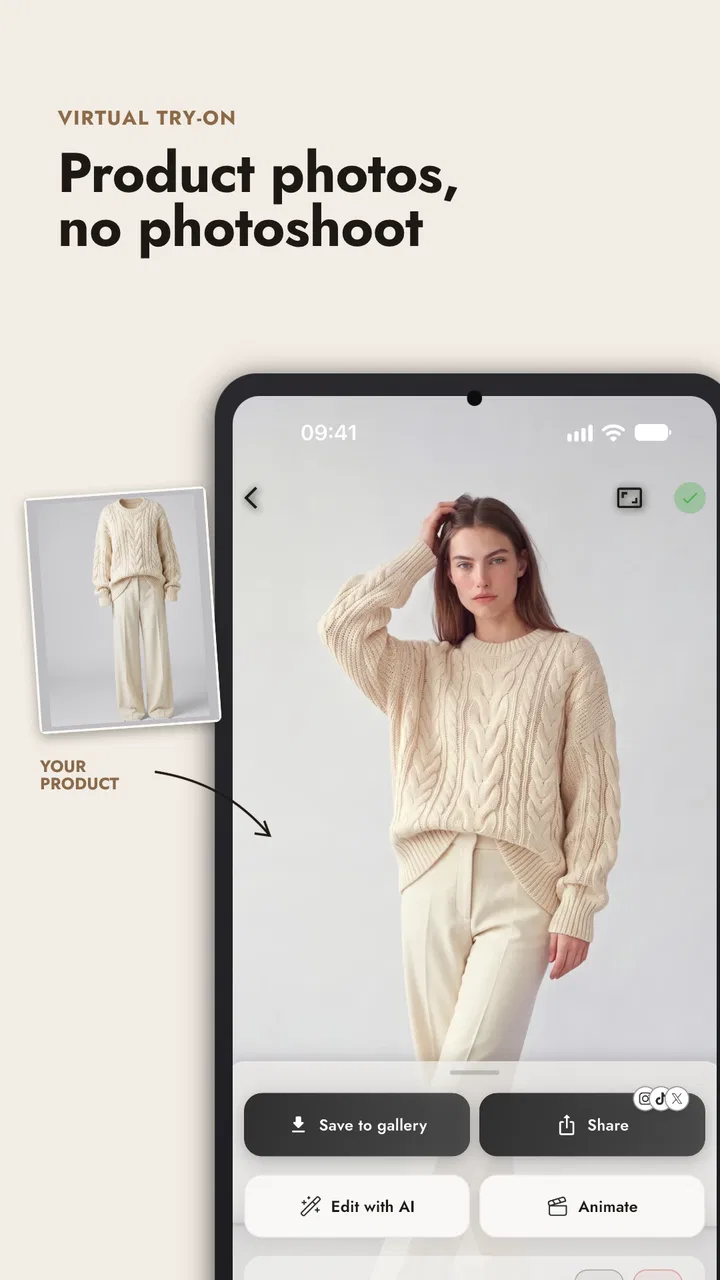
ClothShift is a free beauty app from ElmaDev, aimed at people who want to experiment with clothing appearance and modify photos using AI. The central appeal is visual exploration: instead of imagining how a shirt, jacket, dress, or another garment might look, you use an existing image and let the app create a simulated result.
You May Also Like

 Pandora - Music & Podcasts
Pandora’s Music Is Easy to Start, but Harder to Recover
Pandora’s strength is its low-effort path from a seed to a station. Its weak spot is how much confidence it asks you to place in connection, setup, and quiet recovery.

 8 Ball Pool
 Is Built on Rivalries, Rematches, and Routine
A close look at the rivalries, rematches, shared routines, and unanswered safety questions that turn a quick pool match into a persistent mobile community.

 Samsung Music
’s Quiet Strength Is Playing What You Already Own
Its reach comes less from spectacle than from dependable access to a personal library. That simplicity is both the app’s strongest retention engine and its ceiling.

 AccuWeather: Weather Radar
AccuWeather Review: A Quick, Clear Forecast for Everyday Decisions
For everyday plans, the best forecast is the one you can understand quickly. AccuWeather makes rain timing, radar, and local conditions easy to act on, with a few trade-offs.

 Hill Climb Racing
Why Hill Climb Racing Still Turns Crashes Into One More Run
A tiny car, a bumpy hill and one more upgrade: Hill Climb Racing keeps resurfacing because its simple chaos makes every near-miss feel personal.

 AliExpress - Shopping App
AliExpress Makes Global Shopping Feel Personal, but Shoppers Bear the Risk
AliExpress turns a global marketplace into a pocket-sized discovery engine. Its reach is useful, its shopping loop compelling, and its trade-offs easy to miss.
More From Our News Desk
View All News


That makes it different from a normal selfie editor. Traditional beauty apps usually concentrate on skin smoothing, face shaping, makeup, lighting, or decorative effects. ClothShift is more ambitious because clothing occupies a much larger and more complicated part of an image. Sleeves, collars, folds, body position, hair, hands, and shadows all have to remain believable at the same time.
In my experience with this type of tool, the quality of the input matters almost as much as the app itself. A front-facing photo with good lighting and a clearly visible upper body gives an AI editor a much easier task than a dark picture taken at an angle. If the original clothing is hidden by crossed arms, a bag, long hair, or another person, the result has fewer reliable visual clues to work with.
The most useful way to think about ClothShift is as a visual mock-up tool, not a fitting-room replacement. It can help you explore an idea, prepare a social post, or decide whether a style is worth investigating. It should not be treated as proof that a garment will fit your measurements, feel comfortable, or look identical in person.
Who will get the most from it
I can see the app appealing to fashion-conscious users who enjoy experimenting before making a decision. It is also potentially useful for someone planning an outfit for a party, building a mood board, or comparing several style directions without changing clothes repeatedly. If your goal is creative rather than technical, an imperfect result may still be valuable because it helps you picture a general silhouette or color combination.
Content creators may find another practical use. A quick AI clothing change can help test the visual direction of a post before arranging a full photo session. Someone preparing a resale listing might also use an edit as a concept image, although I would never present an AI-generated appearance as the actual condition or fit of an item. Honesty matters especially when another person could make a purchase decision based on the image.
The app is less suitable for shoppers who need dependable sizing information. It cannot replace garment measurements, a retailer’s size chart, return terms, or a real photograph of the clothing on a body with similar proportions. It is also not the best choice for users who want a highly controlled professional workflow with precise masking, layers, and manual corrections.
The image workflow matters more than the novelty
The first practical lesson is to prepare the image before asking the AI to do anything. I would choose a well-lit photo with one person, a simple background, and enough space around the body. A neutral stance is usually safer than a dramatic pose. This may sound obvious, but it makes a noticeable difference because the system has fewer competing shapes to interpret.
A useful everyday scenario would be choosing an outfit for a dinner after work. I might take a clear standing photo at home, use a reference image of a jacket, and compare the general impression with my existing trousers and shoes. If the result suggests that the jacket overwhelms the rest of the outfit, I have learned something useful before spending time shopping. I would still confirm the fabric, cut, and measurements elsewhere.
For better comparisons, I would keep the base photo unchanged and alter only one clothing idea at a time. Changing the pose, background, lighting, and garment together makes it difficult to tell what caused an improvement or a failure. This simple habit turns the app from a novelty into a more useful style-testing notebook.
Another non-obvious tip is to judge the edges first. Look at the collar, shoulders, wrists, waistline, and places where clothing meets hair or hands. A result can look convincing at thumbnail size while revealing distortions when viewed more closely. If the edges are clean but the fabric pattern is slightly imperfect, the image may still work for inspiration. If the body outline is warped, I would discard it rather than trying to interpret the result.
Where the AI edits are convincing and where they struggle
AI clothing edits tend to work best when the garment has a clear shape and the person’s pose is uncomplicated. A jacket over a visible torso is easier to imagine than a loose, layered outfit with overlapping accessories. Strong shadows can also confuse the edit, especially when the original clothing and the requested clothing have very different structures.
Hands and hair deserve special attention. They often cross the area that needs to be changed, and an automated edit may produce strange boundaries around them. Long sleeves can also create problems because the system must decide where the arm ends and the garment begins. I would not judge the app solely from one failed image, but I would repeat the test with a cleaner photo before deciding whether the problem is the tool or the source material.
Backgrounds can affect the impression too. A plain indoor wall gives the edit room to breathe, while a crowded street or patterned room can make small errors harder to notice at first and more distracting later. If I wanted to share an image publicly, I would inspect it at full size rather than trusting the preview.
What the current release tells me about the product’s direction
The app was released on January 24, 2025, and its current version is 2026.5.7. That version information suggests an actively updated product rather than a one-time upload, although a newer version number by itself does not guarantee that every visual problem has been solved. I would separate the encouraging sign of continued version progression from the harder question of day-to-day reliability.
For an existing user, an updated release can be valuable if it improves the handling of clothing boundaries, reduces failed generations, or makes the editing process easier to repeat. Those are the changes I would care about most, because they directly affect whether the app saves time. A new interface detail is less important than getting a clean result from an ordinary photograph.
The minimum operating-system requirement is Android 7.0 or later, so the app is positioned to support a broad range of Android devices. That does not mean every phone will offer the same experience. Older hardware may feel slower during image processing, and screen quality can influence how easily you notice subtle defects. I would keep the original photo until I had checked the generated version carefully.
Because the app is free to install, it is easy to test without committing money at the beginning. The presence of in-app purchases ranging from $1.99 to $14.99 per item changes the decision once you want to use paid elements or repeat the workflow frequently. I would first test the basic experience with several different photos before buying anything. One successful result is not enough evidence that the paid route will suit your normal pictures.
How it compares with ordinary beauty editors and shopping tools
Compared with a conventional beauty editor, ClothShift offers a more specific creative purpose. A beauty editor is usually better when the main task is correcting light, reducing blemishes, or making a portrait feel more polished. ClothShift is more relevant when the clothing itself is the subject of the experiment. Choosing between them depends on whether you are changing the person’s presentation or the outfit’s appearance.
Compared with retailer virtual try-on tools, the app has a different advantage and a different weakness. A retailer’s feature may be tied to a particular product and therefore provide a clearer shopping context. ClothShift is more flexible as a general image experiment, but that flexibility can come with less dependable information about the real garment. I would use it to narrow down a style direction, then move to the retailer’s measurements and product photographs before purchasing.
Compared with manual photo-editing software, ClothShift is likely to be more approachable for a quick experiment. Manual tools can offer better control over masking, color, perspective, and corrections, but they require patience and skill. If I needed one carefully finished image, I might prefer a more advanced editor. If I wanted to test several clothing concepts quickly, the AI approach would be more convenient.
Friction that affects everyday use
The low average rating should not be ignored. It does not tell me that every session fails, but it does indicate that many users have not found the experience consistently satisfying. For a visual app, inconsistency is especially frustrating because the result is the product. A tool that succeeds only with ideal photos may feel impressive during a demonstration and disappointing during normal use.
There is also a judgment problem that no AI try-on app can completely remove. A generated image may make a garment look more flattering by smoothing its structure or changing how it falls. That can be useful for imagination, but it can also create unrealistic expectations. I would compare the edited result with the original body position and look for changes in proportions rather than focusing only on whether the outfit looks attractive.
Privacy is another reason to be deliberate. Clothing try-ons require personal photographs, and personal photographs can reveal more than the user intended. I would avoid uploading images containing other people, visible addresses, documents, or private surroundings. I would also review the app’s current privacy information before using it for sensitive photos. This is not a reason to reject the app automatically; it is a reason to use it thoughtfully.
The age rating is Everyone, which makes the app broadly accessible in terms of content classification. Parents may still want to discuss sensible photo-sharing habits with younger users, especially when images are being edited or posted publicly. An Everyone rating does not turn an image-editing workflow into a risk-free one.
Small techniques that improve the results
I would begin with a simple baseline image and save the original separately. Then I would test a garment with a distinct outline before trying flowing or layered clothing. This gives me a reference for how the app handles my lighting, pose, and body position. If the baseline fails, changing the garment repeatedly will not solve the underlying issue.
For comparisons, I would use the same crop and the same facial expression. That makes it easier to notice whether the clothing changed convincingly or whether the whole image simply became more flattering through unrelated alterations. I would also avoid judging an outfit from color alone. A successful color transfer can hide an inaccurate neckline or sleeve shape.
One of the more useful trade-offs is speed versus control. AI editing is attractive because it reduces manual work, but the user gives up some precision. If I need to preserve a logo, exact pattern placement, or a particular fold, I would choose a manual editor or a retailer image instead. If I only need to answer “Would this general style suit the picture?”, ClothShift is a better match.
I would also keep a realistic stopping point. After two or three poor attempts with different clean source images, I would stop blaming myself for the prompt or photo and accept that the particular garment may not be a good fit for the tool. Repeatedly regenerating a weak concept can waste more time than changing clothes in the first place.
Who should skip it
I would skip ClothShift if I needed precise fit guidance, dependable product photography, or a professional retouching pipeline. It is also a poor match for anyone who dislikes experimenting with imperfect AI results. Users with a large collection of old, dark, low-resolution photos may spend more time preparing images than enjoying the actual try-on idea.
I would be cautious about paying for it before establishing a personal success rate. Since the app is free to start but includes optional purchases, the sensible approach is to test several ordinary photos, inspect the edges, and decide whether the output is useful enough to justify further spending. The price range alone does not tell me what value I will receive; the value depends on how often the app handles my particular images well.
What I would watch in future use
The most meaningful sign of progress would be improved consistency across everyday photos rather than increasingly dramatic demonstrations. I would watch for cleaner hands and hair boundaries, more believable sleeves, better preservation of body proportions, and a workflow that makes it easy to compare results without losing the original.
I would also look for clearer control over the edit itself. Even a small amount of guidance about what area will be changed, or a practical way to retry without rebuilding the whole project, could make the experience less frustrating. Those improvements would matter more to me than decorative additions because they address the app’s central challenge.
At the moment, I see ClothShift as a free, accessible experiment for visual outfit ideas, not a dependable shopping authority. ElmaDev has created an appealing concept, and the current version shows that the project is still moving forward. Yet the modest rating and the natural limitations of AI clothing replacement mean I would recommend it selectively.
If you enjoy fashion experimentation and are willing to use clear photos, inspect results carefully, and treat every image as an approximation, ClothShift can be fun and occasionally practical. If you need certainty about fit, fabric, or exact appearance, I would choose a retailer’s measurements, a real try-on, or a more controlled editor instead. My recommendation is therefore cautious: try the free experience first, keep your expectations realistic, and pay only if it repeatedly helps with the specific decisions you actually make.
FAQs for ClothShift – AI Fashion Try-On
01What is ClothShift – AI Fashion Try-On, and how does it work?
ClothShift – AI Fashion Try-On is an innovative app designed to enhance your shopping experience by allowing you to virtually try on clothes using AI technology. By uploading your photo, the app superimposes selected clothing items onto your image, giving you a realistic preview of how they would look on you. This helps in making more informed purchasing decisions.
02Is ClothShift available for both Android and iOS devices?
Yes, ClothShift is available for download on both Android and iOS platforms. You can find it on the Google Play Store for Android devices and the Apple App Store for iOS devices. Ensure your device meets the app’s system requirements for the best experience.
03Does ClothShift require an internet connection to function?
Yes, ClothShift requires an active internet connection to function effectively. The app needs to communicate with its servers to process the images and apply the AI algorithms that enable the virtual try-on feature. A stable connection ensures smooth and quick rendering of results.
04Are there any costs associated with using ClothShift?
ClothShift offers a free version with basic features, but it may include in-app purchases or subscriptions for advanced features. These premium options can provide additional functionalities such as an expanded clothing catalog or enhanced AI processing capabilities. Check the app store for the latest pricing details.
05How accurate is the virtual try-on feature in ClothShift?
The virtual try-on feature in ClothShift is designed to be highly accurate, utilizing advanced AI and machine learning algorithms. However, results may vary based on factors like photo quality and lighting conditions. The app provides a realistic approximation, but individual experiences may differ slightly from the actual fit.
Pros
- Realistic virtual try-on experience.
- Wide variety of clothing styles available.
- User-friendly interface for easy navigation.
- Regular updates with new fashion trends.
- Seamless integration with social media.
Cons
- Limited to specific body types.
- Occasional app crashes during use.
- Requires strong internet connection.
- Some features locked behind a paywall.
- Clothing library could be more diverse.

ClothShift – AI Fashion Try-On
Gallery